
Free
Everything you need to run a second copy of an app.
Free
With Google AdMob banner ads
- Clone apps you already have
- Each clone in its own sandbox
- Google sign-in through microG
 New Android app from KSATRIA
Cloneer runs a second, separate copy of an app you already use, in its own sandbox on your phone. Keep work and personal apart, and your clones never leave the device.
Four steps on your own phone. No account to create, and nothing to upload.
Choose any installed app you want a second copy of, such as a chat or a game.
The copy runs in a sandbox inside Cloneer, with storage of its own.
Use a different account in the copy, and keep both signed in at once.
Keep clones in spaces such as Main and Work, and switch in one tap.
Each clone keeps its own accounts, files and settings, apart from the original app and from other clones.
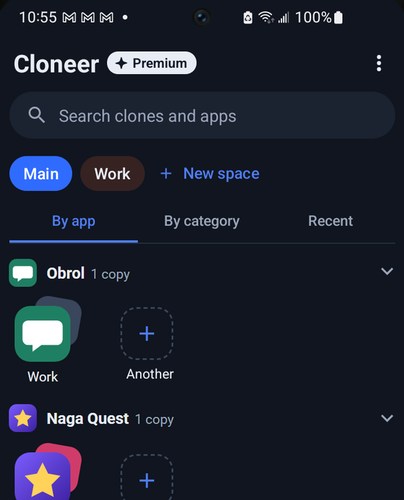
A second copy of a chat app, signed in to a work account.
Clone a chat, a game, a social or a shopping app. Cloneer includes microG, so apps that need Google sign-in can work too.
Some apps detect a clone or refuse to run in one, and a cloned app may not be able to update itself.
The cloning engine collects no analytics and no telemetry. Free users see Google AdMob banner ads, and AdMob collects data of its own.
The engine does not send your apps, your clones or their data to us or to anyone else.
Each clone gets its own device IDs, made on your phone and never linked to your advertising ID.
Remove a clone, or uninstall Cloneer, and its data is gone from your phone.
Premium removes ads and opens every space. Prices are shown in Google Play before you buy.
Everything you need to run a second copy of an app.
Free
With Google AdMob banner ads
Cancel any time in Google Play.
Monthly
or yearly, price shown in Google Play
One purchase, nothing renews.
Once
Price shown in Google Play
Google Play handles payment, renewal, cancellation and refunds. Cloneer never sees your card.
Straight answers about what Cloneer can and can't do.
No. Some apps detect a clone or refuse to run in one, and some ask not to be cloned. App updates, Android updates and differences between phones can also break a clone.
Not always. A cloned app may be unable to update itself from inside Cloneer.
Each app has its own terms, and some don't allow a second copy or extra accounts. You're responsible for following them, so only clone apps you're allowed to use.
No. Each clone's data stays on your phone and isn't sent to us.
The free version shows banner ads from Google AdMob. Premium removes them.
KSATRIA designed, built and publishes Cloneer. We build web and mobile products for clients too.